
If you use Laravel e-mail verification, password reset links, signed routes or temporary signed URLs behind Cloudflare, you may encounter a confusing 403 Invalid Signature issue even though everything appears to be configured correctly.
This article explains a real production issue caused by Cloudflare Flexible SSL and how to fix it properly.
The Problem
A Laravel application using classic authentication and email verification was returning 403 when clicking verification links sent by email.
Example verification link:
https://example.com/email/verify/019e26ac-8a0b-724c-b2f8-fecd302c5d5d/65192be36a35787f5e5c93ad264d52978a6b53f0?expires=1778768904&signature=20d0be7408640703dbbfccd6364146ad2605a89e8df0346c4af0bed50826c7c3Laravel controller:
class VerificationController extends Controller
{
    use VerifiesEmails;

    public function __construct()
    {
        $this->middleware('auth');
        $this->middleware('signed')->only('verify');
        $this->middleware('throttle:6,1')->only('verify', 'resend');
    }
}
At first glance everything looked correct:
- the user existed,
- the UUID matched,
- the e-mail hash matched,
- the user was authenticated (when clicking on the link),
- the signed URL itself validated correctly in Tinker
Yet production still returned 403.
The Failure
Laravel signed URLs include the entire URL in the signature calculation, including:
- scheme (
httpvshttps) - host
- path
- query string
This means the following URLs generate different signatures:
https://example.com/email/verify/…and:
http://example.com/email/verify/…If Laravel signs a URL as HTTPS but internally receives the request as HTTP, signature validation fails.
The Root Cause
The application was behind Cloudflare and configured with Cloudflare SSL mode: Flexible.
Flexible SSL means:
Browser → Cloudflare = HTTPS
Cloudflare → Origin = HTTP
So while the browser used HTTPS, Laravel internally received HTTP requests from Cloudflare.
A temporary debug route revealed the problem:
Route::get('/debug-request', function (Request $request) {
    return [
        'url' => $request->url(),
        'full_url' => $request->fullUrl(),
        'scheme' => $request->getScheme(),
        'is_secure' => $request->isSecure(),
        'host' => $request->getHost(),
        'x_forwarded_proto' => $request->header('x-forwarded-proto'),
        'cf_visitor' => $request->header('cf-visitor'),
    ];
});
Output before the fix:
[
    "url" => "http://example.com/debug-request",
    "scheme" => "http",
    "is_secure" => false,
    "x_forwarded_proto" => "http",
    "cf_visitor" => "{\"scheme\":\"https\"}",
]
This confirmed Laravel saw the request as HTTP.
Why
URL::forceScheme('https')was not enough?
The application already contained:
<?php

namespace App\Http\Middleware;

use Closure;
use Illuminate\Http\Request;
use Illuminate\Support\Facades\URL;
use Symfony\Component\HttpFoundation\Response;

class ProductionOverHttps
{
    public function handle(Request $request, Closure $next): Response
    {
        if (config('app.env') === 'production') {
            URL::forceScheme('https');
        }

        return $next($request);
    }
}
However, this only affects URL generation. It does not magically make the current incoming request secure. Laravel still validated the signed request against:
http://example.com/…while the link itself had been signed as:
https://example.com/…Temporary Debug
To confirm the issue, the signed middleware was temporarily disabled:
// $this->middleware('signed')->only('verify');After disabling it, verification immediately worked. This proved the problem was specifically signed URL validation.
The Proper Fix
The correct solution was:
- Install a real SSL certificate on the origin server
- Change Cloudflare SSL mode from
FlexibletoFull (strict)
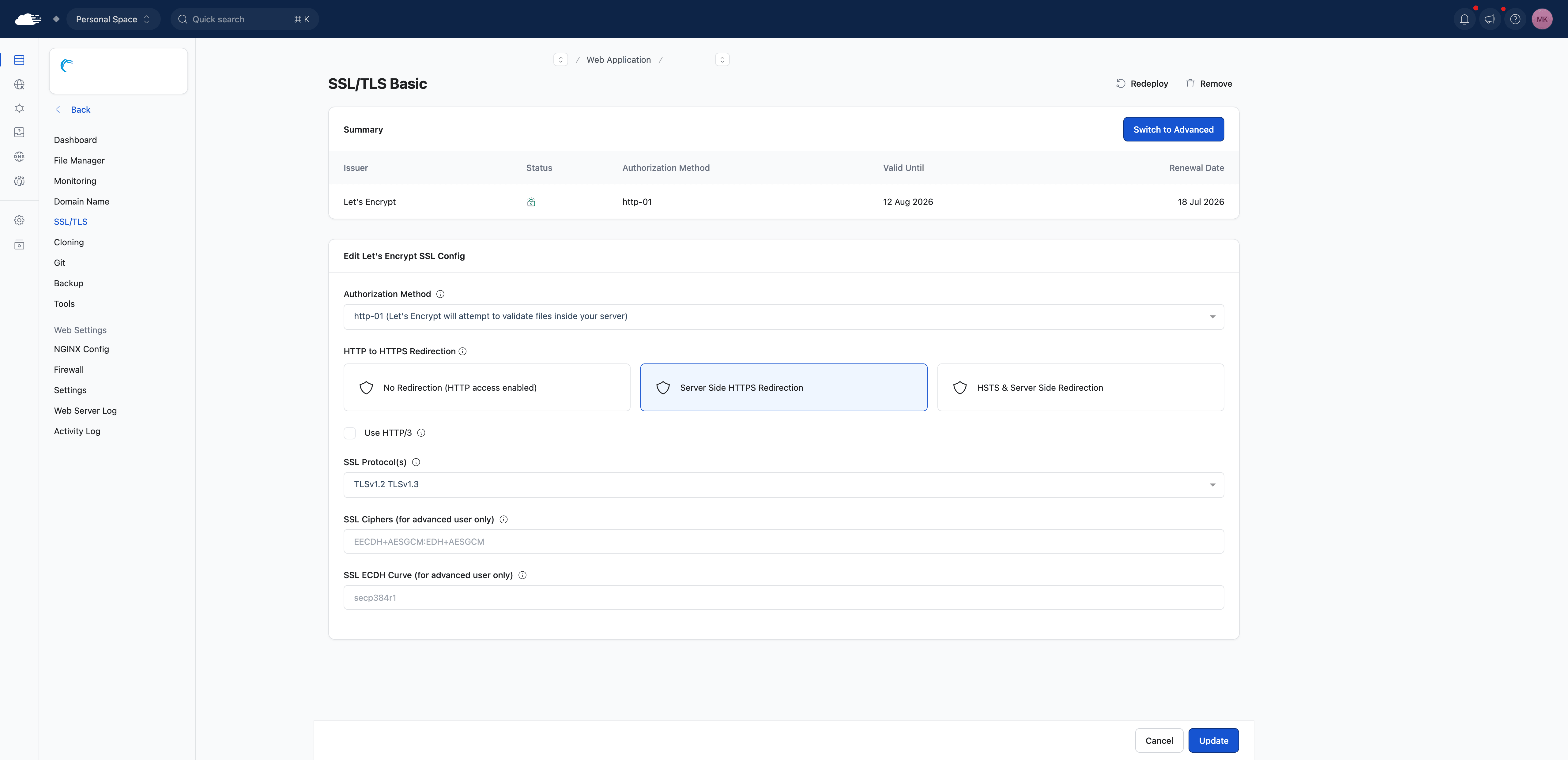
Installing SSL on RunCloud
Select Provider, Authorization Method and enable Server Side HTTPS Redirection
Cloudflare Configuration
After SSL was installed on the origin:
Cloudflare → SSL/TLS → Overview → Full (strict)Result After Fix
The debug route then returned:
[
    "url" => "https://example.com/debug-request",
    "scheme" => "https",
    "is_secure" => true,
    "x_forwarded_proto" => "https",
]
Email verification immediately started working again with the signed middleware enabled.
Cloudflare Flexible SSL can silently break Laravel signed URLs because Laravel validates the full URL including the scheme.
Affected features may include:
- email verification
- password reset links
- signed routes
- temporary signed URLs
- signed download URLs
- unsubscribe links
If you use signed URLs in Laravel, avoid Flexible SSL and use Full (strict) with a valid SSL certificate installed on the origin server.