You can use Terminal (command line) to conveniently download specific version of macOS as long as the hardware you use for the process supports it. Follow this guide to learn how to obtain macOS without clicking too much.
Prerequirements
Make sure that your Mac is using macOS Catalina 10.15 or later.
Command Syntax
Open terminal app of your choice and paste the following command:
softwareupdate --fetch-full-installer --full-installer-version <number>where <number> is replaced with the latest version number of the compatible macOS release you want to download.
How do I know which number I should provide?
This is covered by another command so that you don't have to leave terminal. Simply type:
softwareupdate --list-full-installersAfter a brief moment, you should see output similar to:
Finding available software
Software Update found the following full installers:
* Title: macOS Tahoe, Version: 26.4.1, Size: 17814740KiB, Build: 25E253, Deferred: NO
* Title: macOS Tahoe, Version: 26.4, Size: 17811245KiB, Build: 25E246, Deferred: NO
* Title: macOS Tahoe, Version: 26.3.2, Size: 17514167KiB, Build: 25D2140, Deferred: NO
* Title: macOS Tahoe, Version: 26.3.1, Size: 17509994KiB, Build: 25D2128, Deferred: NO
* Title: macOS Tahoe, Version: 26.3, Size: 17102233KiB, Build: 25D125, Deferred: NO
* Title: macOS Tahoe, Version: 26.2, Size: 16975578KiB, Build: 25C56, Deferred: NO
* Title: macOS Tahoe, Version: 26.1, Size: 16890687KiB, Build: 25B78, Deferred: NO
* Title: macOS Sequoia, Version: 15.7.5, Size: 15288972KiB, Build: 24G624, Deferred: NO
* Title: macOS Sequoia, Version: 15.7.4, Size: 15284807KiB, Build: 24G517, Deferred: NO
* Title: macOS Sequoia, Version: 15.7.3, Size: 15286709KiB, Build: 24G419, Deferred: NO
* Title: macOS Sequoia, Version: 15.7.2, Size: 15285166KiB, Build: 24G325, Deferred: NO
* Title: macOS Sonoma, Version: 14.8.5, Size: 13338689KiB, Build: 23J423, Deferred: NO
* Title: macOS Sonoma, Version: 14.8.4, Size: 13337772KiB, Build: 23J319, Deferred: NO
* Title: macOS Sonoma, Version: 14.8.3, Size: 13338019KiB, Build: 23J220, Deferred: NO
* Title: macOS Sonoma, Version: 14.8.2, Size: 13337816KiB, Build: 23J126, Deferred: NO
* Title: macOS Ventura, Version: 13.7.8, Size: 11919053KiB, Build: 22H730, Deferred: NO
* Title: macOS Monterey, Version: 12.7.6, Size: 12118346KiB, Build: 21H1320, Deferred: NO
* Title: macOS Monterey, Version: 12.7.4, Size: 12117810KiB, Build: 21H1123, Deferred: NO
* Title: macOS Big Sur, Version: 11.7.11, Size: 12122736KiB, Build: 20G1443, Deferred: NO
* Title: macOS Big Sur, Version: 11.7.10, Size: 12125478KiB, Build: 20G1427, Deferred: NO
* Title: macOS Catalina, Version: 10.15.7, Size: 8055650KiB, Build: 19H15, Deferred: NO
* Title: macOS Catalina, Version: 10.15.7, Size: 8055522KiB, Build: 19H2, Deferred: NO
* Title: macOS Catalina, Version: 10.15.6, Size: 8055450KiB, Build: 19G2021, Deferred: NO
* Title: macOS Catalina, Version: 10.15.6, Size: 8056662KiB, Build: 19G2006, Deferred: NO
The list contains all the possible versions of macOS that can be installed on the machine on which you're executing this command.
Pulling macOS
Let's try to download newest macOS Tahoe, execute the following command:
softwareupdate --fetch-full-installer --full-installer-version 26.4.1Version 26.4.1 is the newest macOS Tahoe. The outpout should be similar to:
Scanning for 26.4.1 installer
Install finished successfully
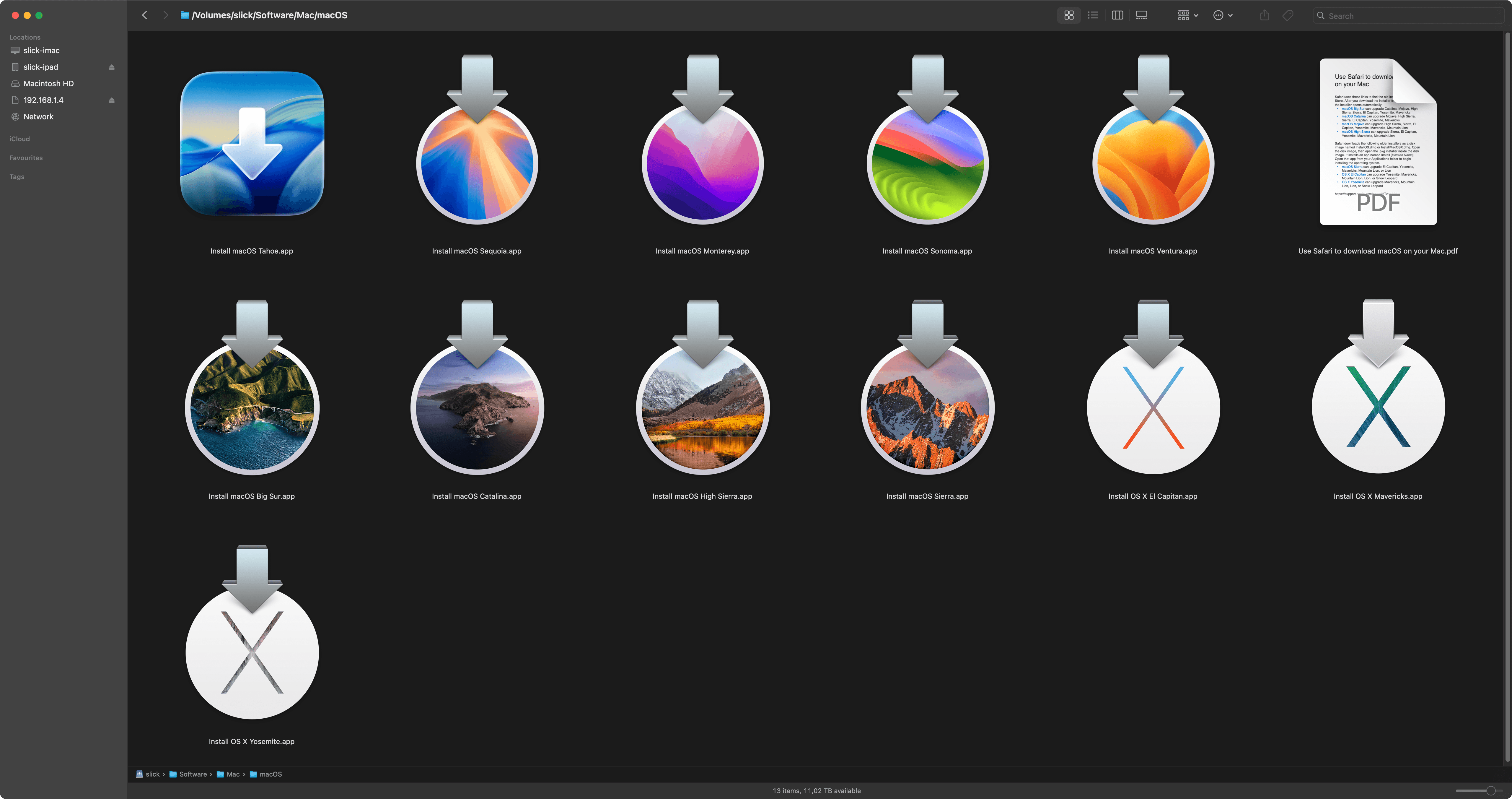
Once the download process is complete, the macOS installer will be placed in the Applications folder. You can move it from there to any location of your choice for later use.
Usage
At this point you can either double click on the installer app to run it directly or you can prepare a bootable image using USB drive for use with other Apple device that is suitable for OS X / macOS.
- Creating Bootable USB Flash Drive with macOS Monterey (2021)
- Creating Bootable USB Flash Drive with OS X Maverics (2014)
This is it.